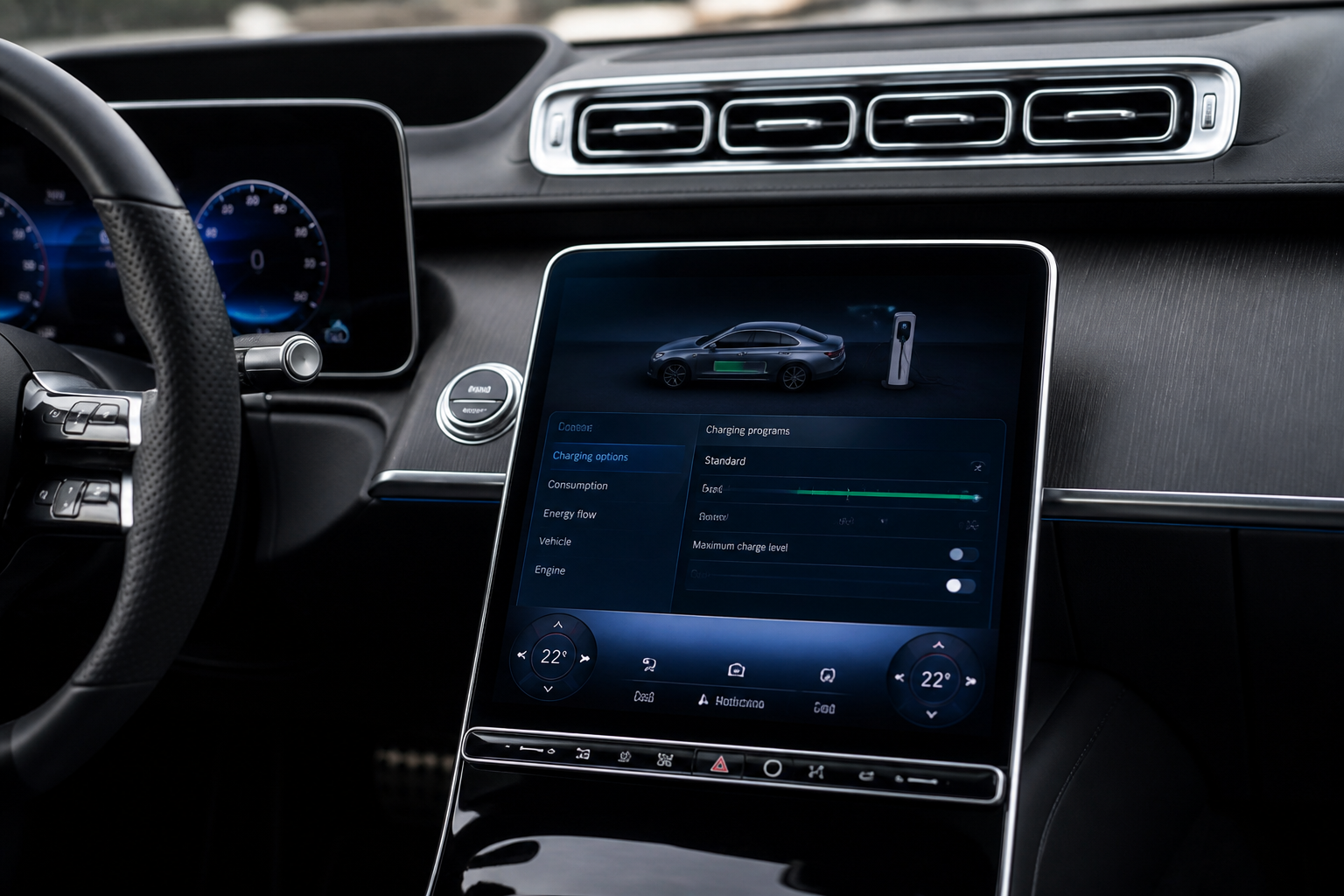
Configure departure-time scheduling and maximum charge level in MBUX by navigating to the vehicle’s charging options within the MBUX interface; set a departure time (which enables charging predictions for that time) and set a maximum charge level (a percentage cap). The two settings are separate: the departure time affects charging timing and predicted state of charge, while the maximum charge level caps charging at the chosen percentage. Recurring schedules may be available depending on model and software version, and pre-entry climate timing can use the saved departure-time schedule where supported.
Key takeaways
- Departure time and maximum charge level are configured separately in MBUX charging settings.
- Departure time uses charging predictions to estimate charge at the target time.
- Maximum charge level caps charging at a chosen percentage, independent of departure time.
- Recurring schedules may be available; pre-entry climate timing can utilize the departure-time schedule where supported.
- Always refer to model-specific menus and the latest owner manuals for exact steps.
How to Set Departure Time & Maximum Charge Level in Mercedes MBUX (EV Charging + Pre-Entry Climate)
Mercedes‑Benz owners increasingly rely on MBUX to manage electric-vehicle charging, battery health, and cabin preconditioning. This expanded guide walks you through where to find the settings, what each option does, and practical considerations that can affect real-world results. It sticks to owner‑level guidance grounded in official manuals and widely observed menu structures, while noting model‑dependent caveats so you can operate with confidence.
Where the charging settings live in MBUX
In most Mercedes‑Benz models with MBUX that offer electrified powertrains, charging controls live in the vehicle’s charging or energy management area of the MBUX interface. There are two core streams you typically encounter: (1) a departure‑time scheduling option and (2) a maximum charge level cap. Some models present these as separate items within a dedicated Charging options flow, while others combine them under a single charging settings menu. Because layout and wording shift with software updates and across models (EQV, GLC Hybrid, EQE, etc.), always confirm via your on‑screen help or the latest owner manual for your exact build. The essential concepts, however, stay the same: you set a target time for departure to influence charging timing and climate control, and you impose a ceiling on how full the battery should become.
What you configure: two related but distinct settings
Departure time is the anchor for charging timing and, where supported, pre‑entry climate timing. When you select a departure time, the system estimates the required state of charge at that moment and uses that to guide charging activity. The charging screen may display an Estimated charge at departure or a similar forecast. This figure is a best‑estimate based on your current charge, the vehicle’s efficiency assumptions, and the lead time before departure. It is a predictive aid, not a guaranteed final state.
Maximum charge level (sometimes shown as max charge state or max charging level) functions as a hard cap. If you set this to, for example, 80%, the system will stop charging once the battery reaches that threshold, even if more energy is available from the charger. This control supports battery longevity, the needs of a daily routine, or storage scenarios where you don’t want a full charge every time.
How to save and what happens after you save
After you configure a departure time and confirm or save it, MBUX activates its charging logic to align energy delivery with the schedule. The charging screen may show a forecast of charging completion time, the expected state of charge at departure, and, if supported, a countdown to the end of charging. If you also set a maximum charge level, charging stops at that cap. If you later modify either setting, most systems recalculate predictions in real time and update the screen accordingly.
Note that the exact user‑interface wording and available options vary by model and software version. The underlying behavior remains: the departure time drives when charging should complete and can trigger pre‑conditioning (pre‑entry climate) if the vehicle supports that feature; the maximum charge level limits how full the battery may become.
Practical usage scenarios
- Daily commute alignment: Choose a departure time that matches your typical leaving window. The system estimates the required charge level at that moment and charges to meet it, potentially running climate pre‑conditioning to optimize cabin comfort and battery temperature for efficiency.
- Battery preservation: For vehicles that sit idle for extended periods, applying a conservative max charge level (for example, 80–90%) can reduce long‑term stress on high‑voltage cells without sacrificing daily readiness.
- Charging window management: If you have variable electricity pricing or limited charging capacity at home, departure‑time scheduling can help ensure charging completes within your preferred window, provided your configuration supports that alignment.
- Recurring schedules: When supported, you can set daily departure times so the system automatically recalculates end states and climate timing, minimizing manual input while you follow a routine.
Model and software version caveats
The steps, labels, and available options differ between models and software updates. Some vehicles present a combined Charging options flow, while others separate departure time and max charging level controls. If you don’t see the exact menu path described here, consult your vehicle’s on‑screen help or the accompanying owner manual for the precise navigation steps for your build. The concepts—departure time driving charging timing (and pre‑entry climate where supported) and max charge level capping charging energy—remain consistent.
What the departure time feature does in practice
When a departure time is active, MBUX uses current state of charge, recent energy usage, and ambient conditions to project how much energy is needed by the target moment. It then tailors charging activity to reach that estimate while respecting any max charge level cap. If pre‑entry climate is available in your configuration, the system may coordinate climate preconditioning to begin ahead of departure using the same schedule. The overall goal is to ensure you arrive with the car in the desired state of charge and cabin comfort, without unnecessary energy expenditure.
Limitations to keep in mind
- Departure‑time estimates are projections. Real‑world energy use, battery health, ambient temperature, charger quality, and grid conditions can cause deviations from the forecast.
- Some regions or configurations may impose stricter charge‑rate or end‑state limits to optimize battery longevity, even if a higher charge would be technically possible.
- Software updates can alter menu wording, layout, or available options. If a feature appears missing or differently labeled, check for the latest OTA update or consult the model‑specific manual for your exact build.
Tips for getting the most out of MBUX charging controls
- Keep your vehicle's software up to date. Many enhancements to charging scheduling and climate integration come with updates.
- If you routinely rely on a specific departure time, test the end‑state after saving to confirm the predicted SoC aligns with your needs. Use short trial periods to calibrate the system’s estimates to your driving pattern.
- Use a consistent max charge level when storage or long parking is expected. This can help balance battery longevity with daily usability.
- When climate preconditioning is enabled, allow a few minutes of lead time before departure for comfort and efficiency, especially in extreme temperatures.
If you share your exact Mercedes model and software version, I can tailor the navigation steps for your build and highlight any model‑specific quirks, options, or terminology you should expect in your MBUX interface.
Sources
- EQV MPV 2020 December MBUX Owner’s Manual (Charging process: Departure time, charging display, max charge level/current)
- 2020 Mercedes-Benz GLC Hybrid Operator’s Manual (MBUX multimedia system: set departure time + maximum charge current)
- NHTSA RCL Document: Initial NCU Update BMS Software (includes MBUX-related charging/SoC change reference used in the update instructions)